Webhooks ar Legalesign
Cad iad webhooks
Is iad webhooks do URLanna ina seolfaidh Legalesign nuashonruithe stádais i bhfíor-am. Is féidir leat do URLanna féin a chruthú nó is féidir le córais uathoibrithe (cosúil le MS Power Automate) iad a ghiniúint le tosú ar shruth oibre.
Mar shampla, sa taispeántas seo cruthaimid URL le Microsoft Power Automate. Cuirimid an URL sin leis mar an webhook i Legalesign nuair a shíniútear doiciméid. Gníomhófar sreabhadh Power Automate nuair a shíniútear doiciméad agus sábhálfaidh sé na PDFanna nua-shínithe go huathoibríoch chuig Sharepoint. Foghlaim níos mó faoi MS Power Automate.
Nóta tábhachtach - ní mór duit ceadanna Riaracháin foirne a bheith agat chun imeachtaí foirne a fháil ar do webhook.
Cén fáth go dteastaíonn webhooks uait
Cuireann webhooks ar do chumas córas tiomnaithe d’imeachtaí a chothabháil. Nuashonróidh webhooks tú ar gach imeacht laistigh de do ghrúpaí. B'fhéidir go n-úsáidfeá iad chun do dhoirseamh beo féin a chruthú agus/nó iad a úsáid chun sioncrónú a dhéanamh le do bhunachar sonraí féin.
Mar a luaigh muid thuas, cuireann webhooks ginte ag córais uathoibrithe cosúil le Power Automate ar do chumas próisis stórála, ríomhphoist, coinneáil taifead a thosú, srl., a sholáthraíonn, i dteannta leis an API, gach rud a theastaíonn uait chun uathoibriú próisis.
Tá síntiús fotha websocket fíor-ama ar fáil freisin. B’fhéidir go mbeidh sé níos oiriúnaí seo nuair is mian leat nuashonruithe beo ar thaobh an chliaint gan deireadh a chur le deisceann webhook a nochtadh. Cuireann an websocket tacar níos leithne d’imeachtaí ar fáil ná webhooks.
Is cosúil go mbíonn webhooks beagán casta, ach tá siad i ndáiríre fiúntach agus iontach do do chomhtháthú. Lean ort ag léamh.
Cineálacha webhook
- Imeachtaí fíor-ama
- Gach imeacht gach 6 nóiméad (oidhreacht)
- Ag [imeacht] (oidhreacht)
Le haghaidh webhooks oidhreachta féach: legacy webhooks
Bíonn webhooks á n-úsáid go coitianta chun PDF sínithe a íoslódáil. Nuair a chruthaíonn tú an webhook, cuireann tú scagaire imeachta 'Cruthaíodh PDF deiridh' i bhfeidhm. Sa chód atá agat, tá request.body isteach i bhformáid JSON, déan é a pharsáil agus bain documentId = ['data']['uuid'] as. Anois déan an fiosrúchán API chun an PDF a íoslódáil - GET https://eu-api.legalesign.com/api/v1/pdf/${documentId}/.
Conas webhook a chur leis nó a bhaint
Cuir nó bain webhook ag úsáid an aipe gréasáin
Téigh go dtí an forbhreathnú API agus cliceáil chuig rannán na Webhooks. Tá rialuithe simplí sa fhoirm chun webhooks a chur leis nó a bhaint. Is féidir leat imeachtaí webhook a leithlisiú go roghnach do fhoirne áirithe agus/nó imeachtaí áirithe.

Faigheann do webhooks imeachtaí ó gach cuntas ina bhfuil tú riarthóir, idir forbartha agus táirgthe. Úsáid an scagaire grúpa chun webhooks éagsúla a dhéanamh do do ghrúpaí éagsúla.
Cuir nó bain webhook ag úsáid an REST API
Féach ar an rannán 'webhook' ag bun an nascleanóra clé laistigh de dhoiciméad API: REST API webhooks
Cuir nó bain webhook ag úsáid GraphQL
Nua! Sa Legalesign GraphiQL Explorer, sínithe isteach i do chuntas Legalesign, tá cumhachtaí iomlána CRUD agat thar webhooks. Is féidir webhooks a liostáil mar thréith den chineál User, agus tá mutations le haghaidh createWebhook, updateWebhook agus deleteWebhook.
Cad atá i webhook?
Is é an bealach is tapúla le do shonraí a iniúchadh ná webhook a chur leis, roinnt doiciméad tástála a sheoladh/síniú/déanach a fheiceáil san aip ghréasáin, agus ansin logaí na webhooks a fheiceáil sa Forbhreathnú API Legalesign.
Más gá duit URL webhook sealadach le haghaidh tástála, féach ar ngrok.
Treoir gasta maidir le ngrok: nuair a íoslódálann tú ngrok, cuir ar siúl é sa chríochfoirt le ./ngrok http 80 agus tabharfaidh sé seoladh https duit. Cuir isteach sin mar do webhook. Anois oscail http://127.0.0.1:4040. Sin é, tosóidh tú ag fáil na webhooks agus a sonraí. Tosaigh ag seoladh agus ag síniú doiciméid tástála. Nóta: D’fhéadfadh earráid 5XX a bheith ar ais ó Ngrok, mar sin beidh tú ag súil le neart iarrachtaí agus teachtaireachtaí earráide toisc go dmeasfaidh an córas stádas 5XX mar iarracht theipthe.
Déantar a chinntiú go dtuigeann do chód webhook ag fáil freagra rathúil 2XX. Má tá roinnt eithne cothrom le dáta i do chód, déan freagra stádas 5XX éagsúil a thabhairt. Inseoidh logaí webhook sa Forbhreathnú API ansin cén eithne a ghníomhachtaíodh.
Cruth webhooks fíor-ama
Is féidir go mbeidh dhá scéim sonraí ann, scéim ‘doiciméad’ nó scéim ‘faighteora’. Déan iniúchadh ar an tréith ‘object’ chun a chinneadh cén scéim atá i gceist.
Tá tréith ‘event’ ag an dá scéim freisin. Is féidir scagadh a dhéanamh de réir object agus roghnach de réir event nuair a chruthaíonn tú an webhook.
Seo thíos tábla d’idirghníomhartha agus imeachtaí uile is féidir. Taispeánann an íomhá seo an doiciméad mar réad (dó imeacht 'cruthaithe’). Tá na scéimeanna iomlána JSON ag bun an ailt seo.

Tagann iarratais mar iarratas POST ina bhfuil JSON. Tabhair faoi deara, féadfaidh ábhar an ‘data’ leathnú le himeacht ama chun níos mó réimsí a bheith san áireamh.
Úsáid tréithe ‘tag’. Is féidir suas le 3 tag a shocrú nuair a chruthaíonn tú doiciméad. Trí taganna a úsáid b’fhéidir nach mbeidh ort IDanna Legalesign a shábháil. Is féidir tag a úsáid freisin chun rúndacht a shábháil d’fhonn an iarratas ionchuir a fhíordheimhniú (go raibh maith agat Themis as an moladh sin).
Tábla d’idirghníomhartha féideartha do ‘object’ agus ‘event’:
| object | event |
|---|---|
| doiciméad | cruthaithe |
| doiciméad | diúltaithe |
| doiciméad | cruthaíodhPDFDeiridh |
| faighteoir | críochnaithe |
| faighteoir | diúltaithe |
| faighteoir | ríomhphostOscailte |
| faighteoir | agcuairt |
| faighteoir | bouncet |
| faighteoir | ríomhphostMeabhrúcháinUathoibríoch |
| faighteoir | fógraRíomhphoist |
Is minic nach dtarlaíonn an chuid is mó d’imeachtaí ach uair amháin. Is eisceachtaí iad ag cuairt, bouncet, fógraRíomhphoist agus ríomhphostMeabhrúcháinUathoibríoch; d’fhéadfadh siad tarlú go minic.
Ná déan dearmad cosaint CSRF a mhúchadh do do radharc a fhaigheann na iarratais POST seo.
Seo sampla d’object ‘faighteora’, le himeacht ‘bouncet’:
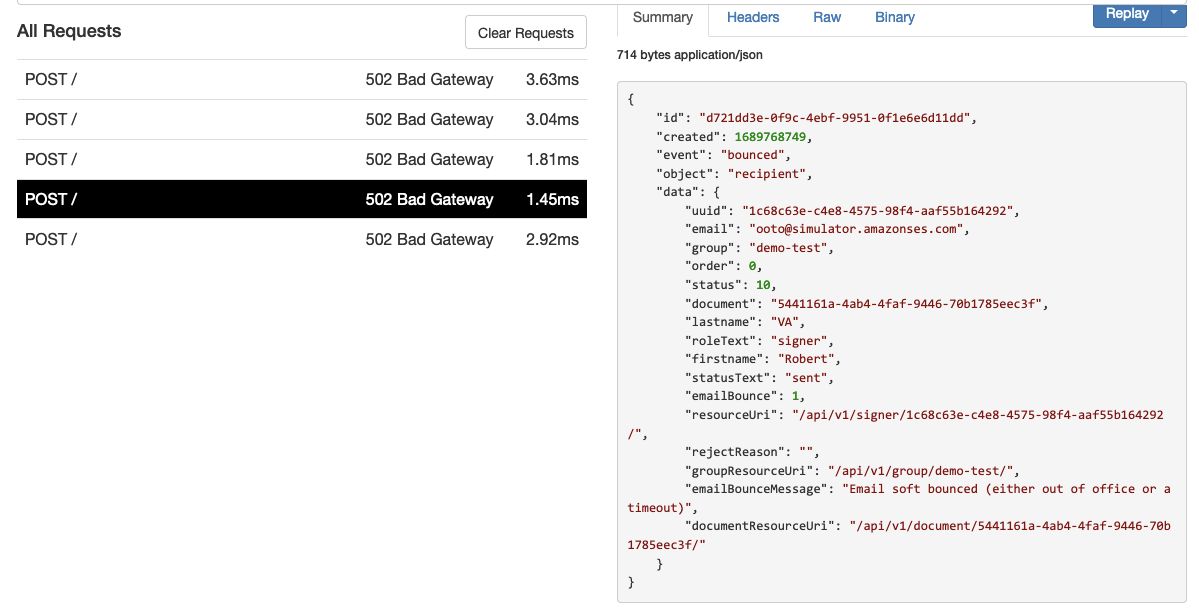
Baineann tú faoi deara emailBounce agus emailBounceMessage i ‘data’. Léireoidh ‘emailBounceMessage’ cineál an bouncet mar seo a leanas:
- Hard bounce: "Message hard bounced" (Bouncing crua)
- Soft bounce: "Email soft bounced (either out of office or a timeout)" (Bouncing bog – as oifig nó am teoranta)
- Delayed: "Message delayed (check email domain exists)" (Moillithe)
D’fhéadfadh tréithe nua a bheith curtha leis ag am ar bith i scéim.
Déan déisiú ar webhooks sa forbhreathnú API
Tá gach webhook logáilte agus is féidir leat a n-ábhar agus cód stádais http a scrúdú i do fhorbhreathnú API. Chun níos mó a fhoghlaim féach ar an Taispeántas Forbhreathnaithe
Spreagadh láimhe webhook
Spreagadh láimhe ar webhook ag úsáid an fhoirme ag bun leathanach na Webhooks i do Pórtáil Forbróra.
Déan cinnte go n-úsáideann tú faighteoir nó ID doiciméid fíor, ag brath ar an imeacht.
Códanna stádais
Cliceáil na naisc seo chun an tábla tagartha le haghaidh stádas doiciméid agus stádas faighteora a fheiceáil.
Fíoraigh webhook
Síneann an webhook an pacáiste sonraí leis an eochair phríobháideach. Is féidir leat é a fhíorú leis an eochair phoiblí - íoslódáil an eochair phoiblí.
- Tá suíomh an téacs sínithe sa cheann X-Signed-SHA256.
- Tá na sonraí atá sínithe ná an iomlán request.body (mar shreang).
Tá an ‘sínithe’ códaithe i bhfoirm base64. Seo cód samplach fíoraithe i node.js:
const crypto = require('crypto');
const fs = require('fs');

const cert = fs.readFileSync('/location/of/downloadedCert.crt', 'utf8');
const c = new crypto.X509Certificate(cert);
const k = c.publicKey
let verifier = crypto.createVerify('SHA256');
let rawdata = 'sentdata' //JSON stringify data in request.body
let sha256signature = 'xxx' //value of 'X-Signed-Sha256' request header.
verifier.update(rawdata);
return verifier.verify(k, sha256signature, 'base64');
Roghnach, tá fíorú bunaithe ar HMAC ar fáil freisin. Don HMAC, roinntear eochair rúnda do do webhooks leat. Tiocfaidh an luach sínithe isteach sa cheann X-HMAC-SHA256.
Tá go leor acmhainní ar líne a thaispeánann conas luach HMAC a fhíorú. Seo sampla fíoraithe i python:
import hmac, hashlib
sentdata = 'sentdata' # JSON stringify data in request.body
hmacvalue = 'xxx' # value of  'X-HMAC-Sha256' in request header.
v = hmac.new('your secret value'.encode(), 'sentdata'.encode(), hashlib.sha256)
isValid = v.hexdigest() == hmacvalue
Nó cód samplach Salesforce Apex chun HMAC a fhíorú:
String message = 'JSONstring'; //sent in request.body
String privatekey = 'privateKey'; //shared value you have been given
String hmacvalue = 'xxx'; //value of  'X-HMAC-Sha256' in request header.
Boolean verified = Crypto.verifyHMac('HmacSHA256', Blob.valueOf(message), Blob.valueOf(privatekey), EncodingUtil.convertFromHex(hmacvalue));
Níos mó webhooks?
Má theastaíonn níos mó webhooks uait le haghaidh imeachtaí éagsúla, nó níos mó sonraí iontu, déan teagmháil linn agus cuir do cheist isteach i líne forbartha.
Tagairt scéime
Tá dhá scéim shoiléire ann, ceann do réad ‘doiciméad’ agus ceann eile do réad ‘faighteoir’. Tá eochracha íochtarcha iad uile ‘object’ agus ‘event’. Déan iniúchadh ar an tréith ‘object’ chun scéim an scéil a chinneadh. Nó bain úsáid as scagadh webhook chun ach réada doiciméad nó faighteora a fháil ar ais.
Tabhair faoi deara go bhféadfadh tréithe nua a bheith curtha leis an scéim ag am ar bith (ach ní laghdaítear iad).
1. Scéim JSON don réad ‘doiciméad’
{
  "$schema": "http://json-schema.org/draft-04/schema#",
  "type": "object",
  "properties": {
    "version": {
      "type": "string",
      "default": "1.0.0"
    },
    "object": {
      "type": "string",
      "default": "document"
    },
    "created": {
      "type": "integer",
      "description": "unix timestamp"
    },
    "id": {
      "type": "string",
      "format": "uuid"
    },
    "event": {
      "type": "string",
      "pattern": "^(created|rejected|finalPdfCreated)$"
    },
    "data": {
      "type": "object",
      "properties": {
        "tag1": {
          "type": "string"
        },
        "recipients": {
          "type": "array",
          "items": [
            {
              "type": "object",
              "properties": {
                "uuid": {
                  "type": "string",
                  "format": "uuid"
                },
                "email": {
                  "type": "string",
                  "format": "email"
                },
                "order": {
                  "type": "integer"
                },
                "status": {
                  "type": "integer"
                   "pattern": "^(4|5|10|15|20|30|35|39|40|50|60)$"
                },
                "lastname": {
                  "type": "string"
                },
                "roleText": {
                  "type": "string",
                  "pattern": "^(signer|approver|witness)$"
                },
                "firstname": {
                  "type": "string"
                },
                "statusText": {
                  "type": "string",
                  "pattern": "^(unsent|scheduled|sent|email opened|visited|fields complete|fields complete excluding signature|witnessing required|completed|download final document|rejected|withdrawn)$"
                },
                "resourceUri": {
                  "type": "string",
                  "format": "uri-reference"
                },
                "rejectReason": {
                  "type": "string"
                }
              },
              "required": [
                "uuid",
                "email",
                "order",
                "status",
                "lastname",
                "roleText",
                "firstname",
                "statusText",
                "resourceUri",
                "rejectReason"
              ]
            }
          ]
        },
        "groupResourceUri": {
          "type": "string",
          "format": "uri-reference"
        },
        "statusText": {
          "type": "string",
          "pattern": "^(available|fields complete|completed|removed|rejected|unknown)$"
        },
        "name": {
          "type": "string"
        },
        "tag": {
          "type": "string"
        },
        "resourceUri": {
          "type": "string",
          "format": "uri-reference"
        },
        "uuid": {
          "type": "string",
          "format": "uuid"
        },
        "tag2": {
          "type": "string"
        },
        "group": {
          "type": "string"
        },
        "status": {
          "type": "integer",
          "pattern": "^(10|20|30|40|50)$"
        }
      },
      "required": [
        "tag1",
        "recipients",
        "groupResourceUri",
        "statusText",
        "name",
        "tag",
        "resourceUri",
        "uuid",
        "tag2",
        "group",
        "status"
      ]
    }
  },
  "required": [
    "version",
    "object",
    "data",
    "created",
    "id",
    "event"
  ]
}
2. Scéim JSON don réad ‘faighteoir’
{
    "$schema": "http://json-schema.org/draft-04/schema#",
    "type": "object",
    "properties": {
      "version": {
        "type": "string",
        "default": "1.0.0"
      },
      "object": {
        "type": "string",
        "default": "recipient"
      },
      "created": {
        "type": "integer",
        "format": "date-time"
      },
      "id": {
        "type": "string",
        "format": "uuid"
      },
      "event": {
        "type": "string",
        "pattern": "^(emailOpened|bounced|visiting|rejected|completed|autoReminderEmail|emailNotification)$"
      },
      "data": {
        "type": "object",
        "properties": {
          "tag": {
            "type": "string"
          },
          "tag1": {
            "type": "string"
          },
          "tag2": {
            "type": "string"
          },
          "uuid": {
            "type": "string",
            "format": "uuid"
          },
          "email": {
            "type": "string",
            "format": "email"
          },
          "group": {
            "type": "string",
            "format": "uuid"
          },
          "order": {
            "type": "integer"
          },
          "status": {
            "type": "integer",
            "pattern": "^(4|5|10|15|20|30|35|39|40|50|60|70)$"
          },
          "document": {
            "type": "string"
          },
           "documentName": {
            "type": "string"
          },
          "lastname": {
            "type": "string"
          },
          "roleText": {
            "type": "string"
          },
          "firstname": {
            "type": "string"
          },
          "statusText": {
            "type": "string",
            "pattern": "^(unsent|scheduled|sent|email opened|visited|fields complete|fields complete excluding signature|witnessing required|completed|download final document|rejected|withdrawn)$"
          },
          "emailBounce": {
            "type": "integer"
          },
          "resourceUri": {
            "type": "string",
            "format": "uri-reference"
          },
          "rejectReason": {
            "type": "string"
          },
          "groupResourceUri": {
            "type": "string",
             "format": "uri-reference"
          },
          "emailBounceMessage": {
            "type": "string"
          },
          "documentResourceUri": {
            "type": "string",
             "format": "uri-reference"
          }
        },
        "required": [
          "tag",
          "tag1",
          "tag2",
          "uuid",
          "email",
          "group",
          "order",
          "status",
          "document",
          "documentName",
          "lastname",
          "roleText",
          "firstname",
          "statusText",
          "emailBounce",
          "resourceUri",
          "rejectReason",
          "groupResourceUri",
          "emailBounceMessage",
          "documentResourceUri"
        ]
      }
    },
    "required": [
      "version",
      "object",
      "data",
      "created",
      "id",
      "event"
    ]
  }