Email placeholders
Placeholders allow you to fill in a lot of signer details without having to individually type them out.
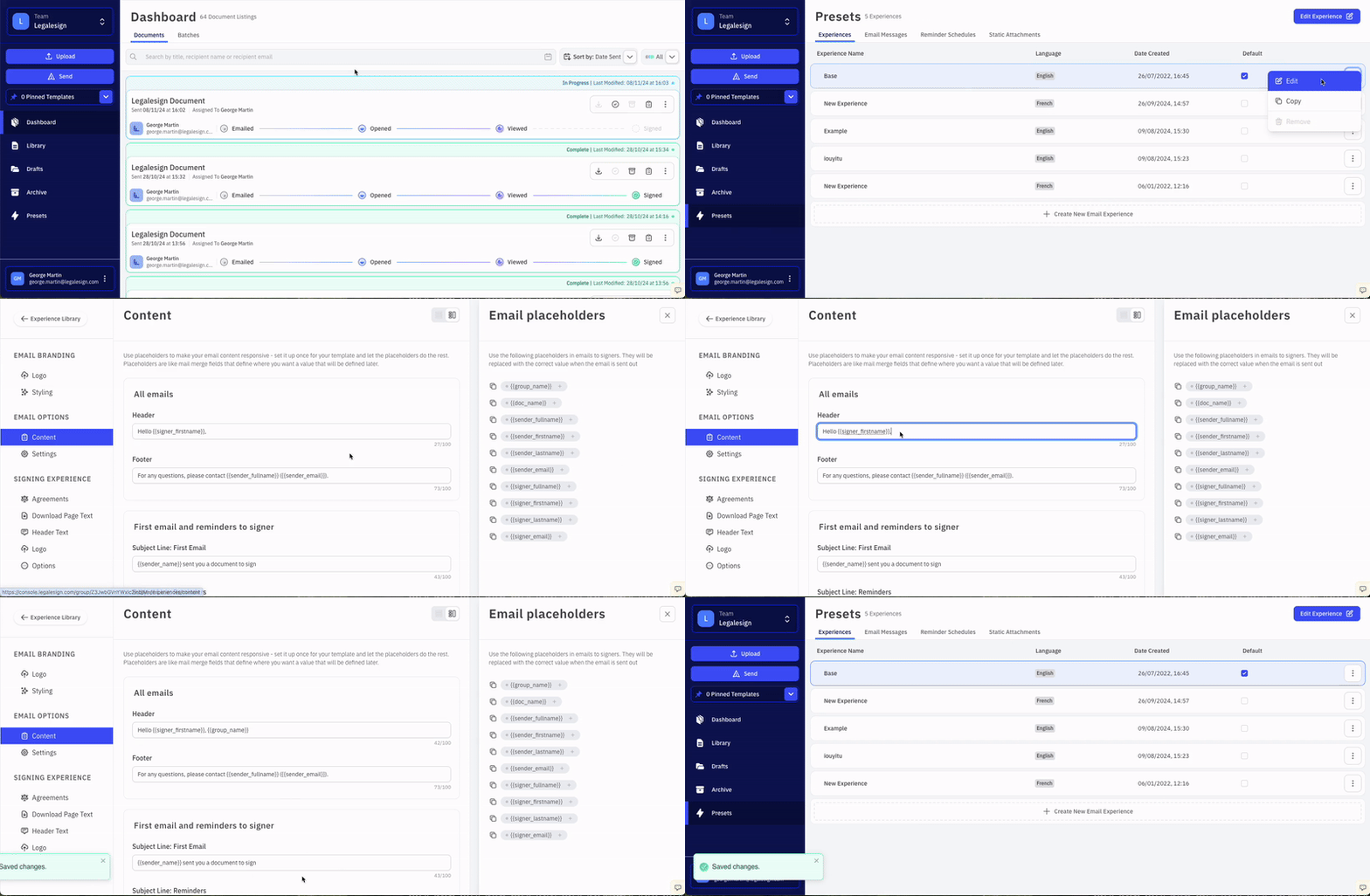
They are like mail merge fields that define where you want a value that will be defined later. You will want to use placeholders for signer names for example.
You can use these placeholders in any email-related text field, simply visit Presets > Experiences and select an Experience to edit, or go to Presets > Email Messages to create a custom default email message which includes placeholders.
Use the following placeholders in emails to signers. They will be replaced with the correct value when the email is sent out.
-
{{group_name}}- the public name of the group you are sending from -
{{doc_name}}- the name you give the sent document -
{{sender_fullname}} -
{{sender_firstname}} -
{{sender_lastname}} -
{{sender_email}} -
{{signer_fullname}} -
{{signer_firstname}} -
{{signer_lastname}} -
{{signer_email}}
You can also use your own SMTP, although we recommend using the standard Legalesign one for fast and reliability throughout.
We highly recommend using a preset email message commencing Dear {{signer_firstname}} as well as adding more text to the message to improve email deliverability and avoid warnings.